 Vancouver Island Master Gardeners
Advice Clinic Report
For Clinic Co-ordinators:
Please complete this form online: Clinic Report webform
Before the end of the Advice Clinic, the CC reviews with each Clinic team member their written record sheets, and notes the questions chosen by each member for the final Clinic Report. The CC then returns all clinic question record sheets to their authors to keep for their own records. CCs do not need to complete their own question record sheets, unless to record questions asked of them that are different from questions noted by the other VIMGA team members, or if she/he wants a personal record.
The CC or designate then completes a copy of the Advice Clinic Report form on their computer, and sends the completed document using the "send" button at the bottom of the form.
If for any reason the webform does not work for you, you can download a PDF version of the form, which you can complete on your computer using software like Adobe Reader, and then email to the Regional Planning Co-ordinator.
For Interns and CMGs:
Print this form: CMG Record of Clinic Questions
Print this form: Intern Record of Clinic Questions
Interns and CMGs (other than the CCs) document questions asked of them at the Clinic on a paper copy of their “Record of Clinic Questions” form. Before the end of the Advice Clinic, team members review their completed forms with the CC, discussing the Qs and As, and indicating which question each has chosen for the final Clinic Report. The Clinic team members then take their completed forms back from the CC and keep them for their own records.
How to use the Advice Clinic Report web-based form
At the top of the form is a section labeled "Clinic". This includes the name, date, times and location of the clinic.
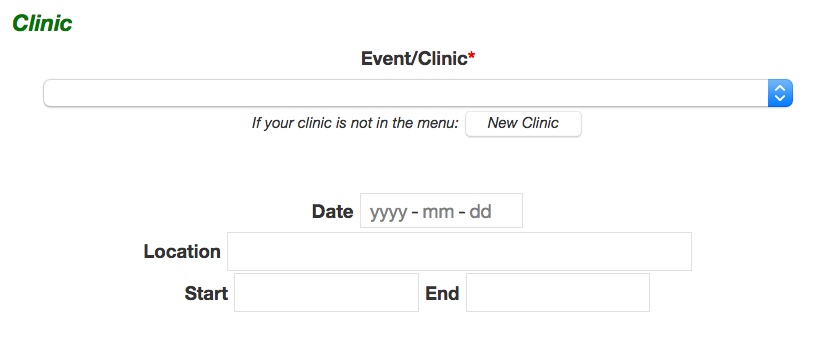
The Location, Date, and Start and End times cannot be entered or edited. To populate these fields, choose a clinic from the "Event/Clinic" drop-down menu. The clinics are listed in date order and show the date and location. If there is more than one table for an event, you may have to guess which table is yours, and then change to another if the volunteer names shown are not your table. Note that only clinics for which no report has been submitted will be shown.
If your clinic is not in the list, click on the "New Clinic" button. This will take you to a new form on which you can enter all of the information for the missing clinic. To learn how to do that, read the Advice Clinics documentation.
When you have chosen a clinic, the clinic information will automatically be filled-in for you. In addition, the VIMGA Volunteers section, listing the names and times of the MGs and Interns attending the clinic, will also be filled in:
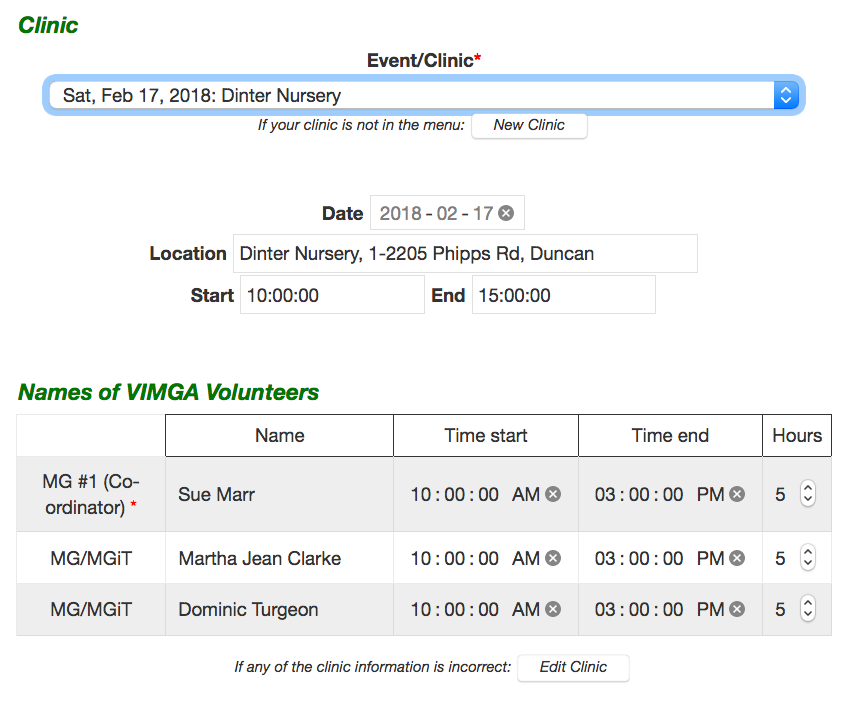
If the clinic information is incorrect, click on the "Edit Clinic" button. This will take you to a new form on which you can edit any of the data for the chosen clinic. To learn how to do that, read the Advice Clinics documentation.
Individual volunteer's times can also be changed on this form. Simply click on the time to be changed and enter a new value.
The rest of the form is quite straightforward: simply fill in the text boxes and click the appropriate buttons and boxes.
NOTE about Section 8: Sample Questions Asked and Answers Given: When filling out this section, we are looking for not only questions that were asked, but also the answers that were given. This is so we can compile a "knowledge database" or FAQ (frequently asked questions). Please list several questions that were asked and the answers that were given.
Saving and Sending
At the bottom of the form are two buttons: "Save" and "Save and Send".
Save: Save all of the entered information into the database.
Save and Send: Save all of the entered information into the database and email a report to the RPC and to all of the volunteers listed at the top of the form.