 Vancouver Island Master Gardeners
Record of Volunteer Hours
The Record of Volunteer Hours (RoVH) is an online form that all active and alumni VIMGA members — CMGs and Interns — are required to complete each year by October 31. The form records each member's hours spent on various activities, including advice clinics, article writing and similar activities, education, and administration duties such as serving on committees and the Board of Directors.REMINDERS:
- Please record all your MG Volunteer Hours. The “Hours Requirements” noted on the front of this form are only the minimum requirements for maintaining certification. There is no limit to the number of hours a member may volunteer for - members are encouraged to participate in as many activities as possible. VIMGA aggregates all members’ hours and reports them annually to organizations such as MGABC and VIU to help with activity review and planning. Aggregated volunteer hour information may also be submitted in support of grant applications for public or special projects.
- Completed Record of Volunteer Hours (RVH) reports must be completed by October 31st of each year, VIMGA’s year-end date. Note that you do not have to actually submit the form as the Regional Planning Co-ordinator as access to all forms at any time.
How to use the RoVH web-based form
The web-based Record of Volunteer Hours (RoVH) form is available here:
https://www.vimga.org/record-of-volunteer-hours-form/
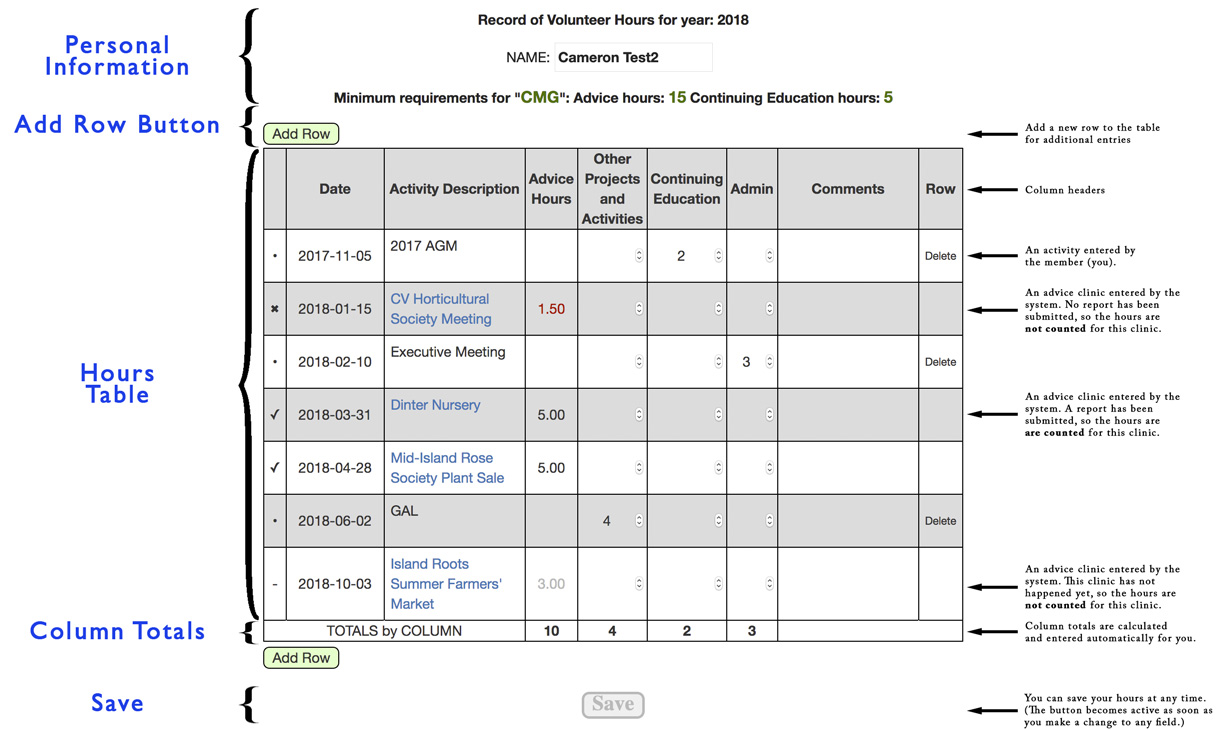
Here's what the form looks like. Each the the sections named on the right are more fully explained in the sections below:
Personal Information
At the very top is the year for which you are reporting your hours. It shows the current year until Nov 1, at which time it clicks over to the next year.
Following that is your name (based on the usrname you used to login to the system), your position - CMG, Intern 1st year, Intern 2nd year, Lifetime Member, or on Leave of Absence - and the number of advice hours and continuing education hours required to remain a member in good standing.
The "Add Row" button
When you click the "Add Row" button, a new row is added to botton of the Hours Table. Adding a row to the table gives you the opportunity to record hours for a new activity: a committee meeting you attended (admin hours), a gardening seminar you attended (continuing education hours), an article you wrote or GAL session (other projects and activities).
For a full explanation of the what hours you can record and how to record them see the What to put on the Record of Volunteer Hours section, below.
The "Save" button
At the bottom of the form is the "Save" button.
You can save the information you have entered on the form at any time and as many times as you want. This means that you can continually update your record throughout the year and not have to worry about remembering everything you have done when the year-end (October 31) rolls around.
Record of Hours table
Below the personal information and the "Add Row" button is a 9-column table in which your volunteer hours are recorded.
Advice Clinic Data
Before getting into further detail about the layout of the table, it is important to understand that advice clinic data are automatically filled in for you. The system knows the clinics that you volunteered for and knows how long each of those clinics lasted, so it is able to fill in the date, clinic name and hours.
You cannot edit this data: everything comes from the database.
However, if something is incorrect, it can be corrected. You can contact the Clinic Co-ordinator for the clinic in question, who can then change the hours recorded on the Advice Clinic Report Form, or change the times of the clinic itself on the Clinic Form.
Here's an explanation of each of the columns:

- The first (un-named) column shows the Status of the of the row. It will contain one of four symbols:
- • (a bullet, or dot) indicates that this entry is not an advice clinic and the hours are included in the totals. These will be hours that you recorded in a row created by the "Add Row" button.
- ✓ (a checkmark) indicates that this is an advice clinic for which a clinic report has been submitted and the hours are included in the totals.
- ✖ (an 'x') indicates that this is an advice clinic for which a clinic report has not been submitted and the hours are not included in the totals.
- - (a dash) indicates that this is an advice clinic that hasn't happened yet: it's still in the future and the hours are not included in the totals.
- The Date is fairly self-explanatory. For advice clinics, it is filled in for you automatically. If you have questions about what to enter as a date, put a comment in column 8 "Comments", or contact the RPC.
- Next is the Activity Description , which is exactly that: a description of what you were doing to earn your hours. In the case of an advice clinic, this column will be automatically filled in for you with the name of the clinic.
- The Advice column shows hours for each of the Advice Clinics you signed-up for. The number of hours shown will be:
- red for those clinics that have been held but for which a clinic report has not been submitted
- black for those clinics that have been held and for which a clinic report has been submitted
- grey for those clinics that have not yet been held (they're still in the future)
- The next three columns are show the number of hours associated with the indicated activity. The hours in these columns are entered by you on rows that you create using the "Add Row" button described above.
- Comments are whatever explanatory information you want to add to this activity: why you added the activity, why the number of hours, whether it was a *good* activity, or anything else...
- The last column, Row, will either be empty or contain the word "Delete". Click on 'Delete' to completely delete a row. Be Careful: This will remove all information about the activity shown on that row: date, description, and hours. Note that this will only show on rows that do not show an advice clinic; in other words, on rows that you created by clicking on the "Add Row" button.
What to put on the Record of Volunteer Hours
Please consult the Member Manual Appendix for additional details; other credit calculations may be determined on a case-by-case basis in consultation with the Regional Planning Co-ordinator (RPC).
ADVICE HOURS: Clinics and Community Projects
On behalf of VIMGA, the Volunteer was in either face-to-face or electronic contact with members of the public who were asking questions or seeking advice at pre-approved venues or programs. Examples: at retail garden centres and nurseries, plant sales, Farmers’ Markets, Garden Advice Parties, community gardens, children’s or seniors’ programs, organized garden tours, plus any research or preparation time needed for any of these activities, and for which an Advice Clinic report has been filed. One hour of credit is normally given for one hour of advice activity, or minimum 5 questions asked, unless noted otherwise. N.B. See separate listing and explanations of Milner Gardens advice activities and hours credited.
OTHER PROJECTS AND ACTIVITIES: Approved Public Speaking, Workshops, Article Write-ups
On behalf of VIMGA, the Volunteer gave a public talk or conducted gardening-related workshops, demos or presentations in the community, plus may have needed up to 3 hours of research or preparation time for any of these activities; the Volunteer wrote gardening advice articles for publication on websites, in newspapers, newsletters or magazines. Examples: Milner Garden Plant Pick articles, MGABC website. N.B. The Volunteer must attach a published copy to the Record of Volunteer Hours form; scanned copies sent by e-mail to the Regional Planning Co-ordinator are also acceptable. Other eligible activities are advice clinics and community projects for which formal Clinic Reports were not submitted.
CONTINUING EDUCATION (Cont. Educ.):
The Volunteer enhanced their professional knowledge with gardening-related learning that can be passed on to the public. This was achieved by attending gardening-related educational lectures, work- shops, seminars, demonstrations, the educational portion of garden club meetings, or by undertaking webinars, related skills-development training, advanced MG programs, or other accredited horticulture programs, such as the Invasive Plant Species of BC, Advanced Master Gardeners Program.
ADMINISTRATION (Admin.):
The Volunteer has undertaken tasks as outlined in the Member’s Manual. Examples: Clinic Co-ordinator administration; VIMGA administrative meetings and their preparation; Basic Training Program mentoring, administration, meetings, and follow-up; attendance at VIMGA and MGABC meetings, or representing VIMGA at other Master Gardener (MG) Association meetings.
* The team member who filed the advice clinic activity report places a tick mark ✔in the box following the activity description; if that team member was not the CC, then he/she may also claim an hour of administration credit for the filing.